In this article, I describe my personal journey to adopting agents and the lessons I’ve learned — as much for you as they are references for future me. I’ll share examples from my setup on a legacy project and a few bite-sized takeaways if you’re embarking on your own adoption journey.
Since early 2026, I have started working almost exclusively via agentic coding1, and that’s in a legacy PHP codebase, which I had previously considered to be untouchable by agents.
I have been quite skeptical of the usefulness of the so-called AI in programming, though open-minded.2 In November 2025 I picked up Claude Code (the Opus model), and if I remember correctly it had been because I’ve seen it referenced and used by several developers I respect3, so I thought I ought to give it proper time to “climb the learning curve” if the best of the best think it’s worthwhile.
I thought about my own personal litmus test – what should agents be able to autonomously handle to prove useful. I settled on a tiny cli app, something that I’d be able to do well myself, so if AI could do it faster and better, I’d consider incorporating agents into my own work. If it would require constant intervention or bugfixes, I’d wait out the AI hype cycle instead. I pointed Claude Code at a certain museum’s API docs and asked it to write a PHP CLI app that downloads high-res images of paintings.
First attempt produced code that looked like code and quacked like code, but simply did not work at all – a familiar experience with LLMs. I reviewed what the agent did, what it got right and what it got wrong, iterated on the instructions, and each round got me a little closer. I experimented with instructions, tonality, levels of detail, different ways of framing the same ask. Eventually, after many hours, I got to a version that worked on the first try: from prompt to working code. It wasn’t an efficient use of my time yet, but it was intriguing – what impressed me was the slither of a distance between bare installation to a few hand-crafted sentences in plain English, and how that directly translated into dramatic output quality improvements. Same tool, quite a different behaviour with a few bullet points written in natural language. I needed to know the ceiling.
That started what I can only describe as a light obsession. Over the next few weeks I would plan an app, start building it with Claude Code, delete it, start another one. Different approaches, different languages, different levels of detail from me. I tried letting Claude do both the planning and the execution. I tried detailed instructions and abstract ones. I tried what other people were trying. I tried this and that.
The experimenting didn’t lead anywhere specific, but it helped me build intuition for the capabilities — and the current limits — of agentic coding. Soon after, I started using agents in my day-to-day work. Slow at first, but the productivity gains4 were real enough that I started reshaping my development environment to be agent-first.
I can honestly say the agents now have a better understanding of the legacy app’s internals than I do. And that’s fine.
Single Context
The cornerstone of what I’ve learned is that agents have a certain mode of working, and you cannot stray too far from it. They have strengths and weaknesses. You can mitigate the weaknesses and lean into the strengths, but only so much. You can’t fight the weaknesses or discover new strengths. The tool does what it does — non-intuitively at times, but it’s still a tool you can only use a certain way.
Inherently single-context workers.
I tried (as many people do) to counter the context limitations by having agents write notes for themselves. The mechanisms vary in technical details, but it’s always the same idea — leaving notes across sessions. The agents will happily play along, but they just don’t work well cross-context. They have no desire to self-improve, learn over time, or give themselves feedback. You can lookup the projects online, and they all sound so intoxicatingly complicated and visionary, and the online community came to call these sort of delusions of grandeur “Claude psychosis”. Be careful, it’s a real thing.
Agents always do.
You give a colleague a silly request, and they’ll call you out on it. You give any request to an agent, and it will write code. Even when it shouldn’t, even when it should stop and ask many questions, even when it should dissuade you from your folly.
This is maybe the most important thing I can tell you about working with agents. Whether your plan is solid or not, the agent will go and try anyway. Worst of all, it will make it sound all fancy and technical and you’ll get the sense of making progress while ultimately wasting your time and ending up feeling frustrated. You have to work around this — give agents constraints, encourage them to not start until ready. But you can’t fully change the behavior. You learn to work with it.
Context is King
Give the agent too little context and it underperforms — it doesn’t know what it’s doing. Give it too much and you get context rot: silly mistakes, hallucinated details, contradictions.
But there’s a sweet spot, and I believe that when you happen to work on a task that fits this, it’s where the feeling of magic happens. When the agent holds not too much, but at the same time a lot more context than a human can store in their head — it performs what a human cannot. Something as simple as holding thousands of lines of code and being simultaneously able to cross-reference each line, noticing that line 2423 uses a dash but line 3454 in a different file uses an underscore. A human can do that, too, but it’s slower, more costly and the conditions need to be just right – perhaps just after the first cup of coffee on a morning with no interruptions. The agent can do this thousands of times per day, maybe even while you’re making your first cup of coffee.
Given that context is probably the most valuable resource of agents, you have to protect it. Keep your CLAUDE.md lean. Keep skills lean. Aggressively trim what you don’t need. I’ve found things often work better with less.
Planning is King
Since agents do even when they shouldn’t, and they’ll fill in any details you leave out, planning becomes indispensable. It’s almost always better to spend twice the time planning rather than to just try something and then spend a frustrating amount of time fixing it.
The Claude Code harness is essentially built around this pattern: iterative planning to one-shot execution. Sure, you can chat with the agent and iterate, but the sessions that produce valuable output follow this shape of plan mode -> auto-accept edits more often than not. It mostly doesn’t work anyway when you try to coerce the agent into fixing things that weren’t well planned.
I don’t fully understand why, but my working theory is that when things fail and you ask for fixes, the failures become part of the agent’s context, and failing somehow becomes more likely. It’s as if bugfixing in the session’s context begets more bugs.
When things go wrong or not according to plan, I’ve learned not to salvage. Start fresh with a better plan – embrace that code is cheap5. Use /rewind to go back to where things were still right, or /fork to try different approaches without risk. It is not valuable — and quite counterproductive — to argue with an agent that keeps failing.
If you spot a bug or misalignment, you can also opt to fix it within the current session and then /rewind only the chat (keeping code intact) to reclaim some of the context back and continue as-if things worked out well on the first try.
Feedback is King
This arises from the same fundamental flaw: agents try at all costs. The AI will happily write code for anything you ask. You’ll feel a spike of dopamine watching it put together a solution. Then the agent proclaims it’s done, and you notice it’s far from done and doesn’t even work.
There isn’t a natural scenario where the agent pushes back that the scope is too big, the requirements too unclear, the tools missing (it will use what’s available, not what’s optimal), or the verification process is missing.
But if you — as a developer with experience — provide the agent with an environment that has sufficient tooling, built-in feedback loops, and a way to verify its own work, this is where the productivity threshold gets crossed. You can watch the agent make mistakes, self-correct, and steer itself toward mostly correct results.
In many ways, your new job as a developer is to think about, design, and build these feedback loops. If your environment doesn’t have them, the agents are just guessing — and they’re more than happy to guess and proclaim the work done regardless of reality. Your job becomes knowing when to constrain the agents and when to let them roam.
Some examples of what I mean by feedback:
Test-Driven Development — agents love to write code, and even when you ask them to write tests, they still write code first and retrofit tests. My TDD instructions go beyond code: I ask agents to verify prerequisites, confirm assumptions, check that tools exist — before they touch any implementation. You can steer agents toward early verification, but you can’t completely change the behavior. At some point you accept the tradeoff.
Log-Driven Development — agents are excellent at parsing text, so logs are a natural feedback loop. Write code, check logs, iterate. They do this far less than I’d like, but text output is something agents work really well with (as opposed to other side-effects like database writes or GUI changes).
Domain-Driven Development — this one is a personal preference. I find the code review process much less cognitively demanding when the output matches the domain language I’m speaking to the agent, and I suspect it helps the agents too when domain model and code are aligned.
Quality test suites — unit, integration, e2e, static analysis. The more objective verification the agent can run on its own, the better the results.
Two modes of working
I’ve landed on a spectrum between two modes.
One is interactive: harnessing the planning, helping the agent, steering it, leveraging strengths and mitigating weaknesses in real-time by watching how it works and where it struggles. I do this on my main workstation. Low friction, but I’m careful about the output and it still feels like “my work.”
The other is fully autonomous: setting up a loop with --dangerously-skip-permissions in a sandboxed environment6 and letting it run overnight. You never know what you’ll get, it’s stochastic by nature. You might be disappointed or pleasantly surprised.
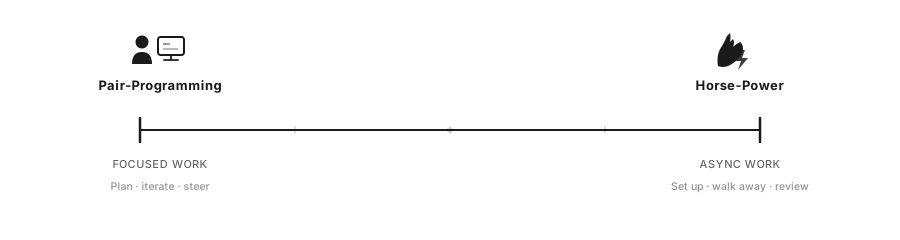
Certain work naturally fits one mode over the other. The more programmatically verifiable the output — say you already have tests that must pass — the better it fits the autonomous end. UI work, exploration, or research benefits from your presence.
Successful experiments:
- Agents click around the GUI, write down notes about what they find, then a second agent the next morning rewrites those notes into coherent documentation and reusable skills.
- Take those docs and rewrite Cypress e2e tests into Playwright.
- Take the Playwright tests and build a custom MCP server for browser navigation, reusable by both e2e tests and agents.
Through this process, I gave the agents a stable way of navigating the UI where frequent actions (user switching, clicking common elements) became programmatic instead of eating tokens reasoning through screenshots.
Failed experiments:
- Rewriting a custom JS SPA to HTMX — this might have worked, but without exquisite e2e coverage there was no way to tell, and the risk was too high.
- Progressively increasing code coverage by writing e2e tests overnight — agents went from ~20% to ~40% (working), then pushed to 50% with half the tests failing, then started ignoring failures and adding random timeouts and going in circles.
- Writing unit tests for all unit-testable code — the agents produced abhorrent tests, things like “write to class property, assert property was written.”
- Rewriting spaghetti code into PSR-4 compatible, unit-testable DDD classes. This went far better then I expected, but in the end the value wasn’t justifiable by the risk of things breaking – agents do quite well in spaghetti code anyway.
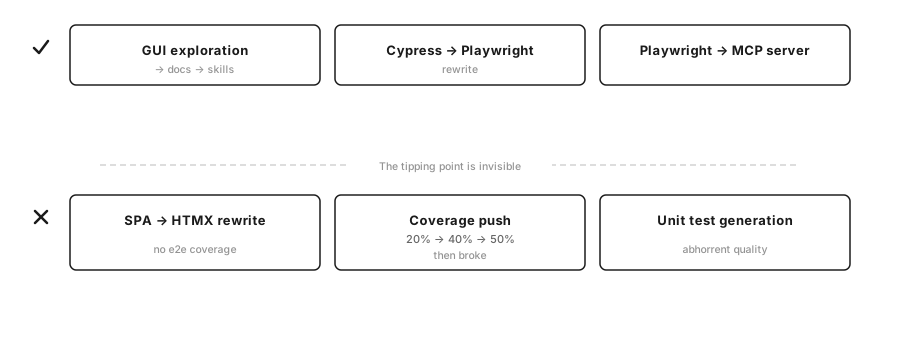
Early results look extremely promising, but then you don’t know where the tipping point is from “valuable” to “mirage,” and the agent’s output is genuinely deceptive — confident comments, clean-looking code, plausible commit messages, all hiding the fact that things are broken. You end up spending time reviewing individual changes (which defeats the purpose of automation) or accepting risk on subtle changes — misleading comments, naming that doesn’t match behavior — that mislead agents just as easily as they fool humans.
Adapting the environment
It became clear early that there are environments where agents thrive and environments where they struggle, and these aren’t necessarily the same conditions that work for humans.
Some of the things I adapted:
Visual feedback in the UI. When in development environment, entities are labeled with their type and ID directly in the interface. A human might remember “blue rectangle means this,” but the agent is seeing it for the first time. Seeing
user_type=manager, user_id=1000is immediate feedback.Playwright navigation reused as MCP. I found that code reuse between e2e tests and agent navigation clicked right away. Agents could verify their own UI output more efficiently — less context eaten by taking Chrome screenshots and reasoning about blue rectangles.
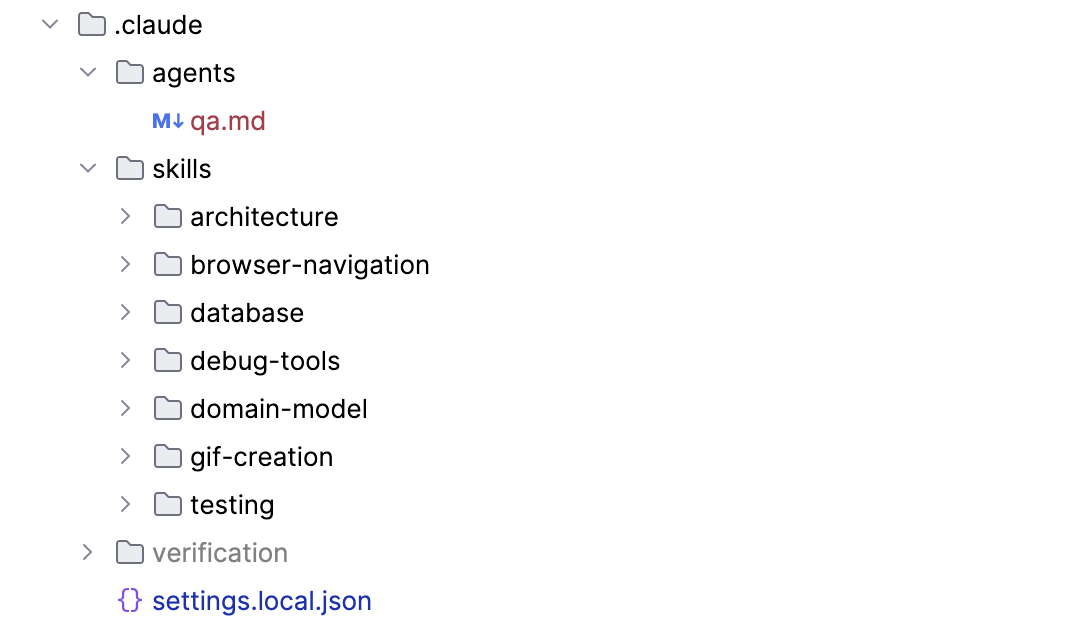
Project-specific skills. These can be agent-generated: just ask agents to explore and write their findings. They’ll do a surprisingly good job most of the time.
ASCII before code. Whenever working on UI, I ask for ASCII mockups (often multiple options) before a plan is written, to confirm mutual understanding. This turned out to be surprisingly useful even outside UI work. The visual communication with agents is often better than text — I can confirm understanding, iterate quickly on options, and I’ve found that when the agent pre-draws something, the output usually matches the drawing really well.
Spaghetti in, spaghetti out. The agent will match the codebase it’s in. Small things work surprisingly well, like introducing clean code in a separate directory — the agent understands that new code in a new directory follows different conventions.
Adapting the workflow
The quality of agent output is directly proportional to the quality of input. This sounds obvious, but it’s easy to forget in practice. I noticed a laziness settling in where I’d try to write fewer words and hope the agent would be clever enough to compensate for my lack of due diligence. Maybe I didn’t want to write three paragraphs about a small detail — it felt unproductive. But the result was failed attempts, whereas a clear description ahead of time would have worked on the first try.
I solved this by switching to voice input (I use Spokenly with a local model — offline, private, free), because sometimes it’s much easier to babble my thoughts aloud and give the agent a lot more context than I’d bother typing. Other times, typing gives my thoughts more clarity and the slowness gives me time to think through what I want to express. I often combine both.
I’m also considering (given the cost) getting an iPad with a Pencil for a workflow of: take a screenshot on the MacBook, have it appear on the iPad, draw on it, circle things, annotate, pass the annotated image to the agent. We still communicate with agents primarily via text, but it seems like communicating visually has real potential — why translate thoughts from visuals to text if the agent can already understand our visuals?
Adoption Journey Lessons
My largest takeaway from several months of agentic coding:
- You must invest in adapting your project/organization to be agent-friendly. The agents thrive in a slightly different environment than humans. Don’t overdo it.
- It is not worth rushing to explore every frontier technique, or strongarming the harness into working a way it wasn’t designed for. The landscape moves incredibly fast. If you wait a few months, the frontier technique gets built into the products you’re already using.
- Which model/harness is best? It matters far less than you’d think. They oscillate every few months, converge on the same features, and all of them get the work done. Pick one and stick with it instead of chasing the next best thing. But if you’re interested in the current heuristics: as of early 2026, Anthropic’s models are generally the most pleasant to work with and OpenAI does better on complex problems.
- Keep one (small) step behind the current trends and you’ll have access to the verified and functional. Unless it’s your passion, don’t build a custom agent orchestrator — wait until the dust settles and a clear pattern emerges.
- The agentic era is addictive and invites you to explore, but there’s a trap: while you must adapt your workflow and tooling for the agents, there’s a threshold you shouldn’t overstep because the diminishing returns are steep — and eventually negative. Run wild experiments to explore and learn, but come back from them and check what actually brings value to the business side.
- The landscape might look completely different a few months from now. But I’m fairly confident one principle will hold: keep it simple, stupid.
My CLAUDE.md
I’ve shared my full CLAUDE.md file at the end of this article. A few observations from iterating on it:
Keep it short. A long CLAUDE.md loses efficiency quickly. Keep it under ~500LoC.
Formatting matters. Wrapping something in <critical></critical> tags does something that plain text doesn’t. So does using emoji as attention markers.
Tone matters. I had a lot of trouble getting agents to self-verify their UI work. I went through many versions of “you must verify UI work by yourself via Chrome” — agents kept insisting I do it (the audacity!) and proclaiming work done long before the finish line. I used /fork and /rewind and tweaked formatting and tone until it finally started working. There is quite a distance between the agent’s understanding of “you must always do this” and <critical>verification via Chrome is always mandatory</critical>.
Directives vs. knowledge. I noticed a real difference between instructions and knowledge. I used to put domain knowledge into CLAUDE.md, but that’s wasteful — agents can learn about the codebase on the fly. The CLAUDE.md should be directives: how to work, not what the codebase contains. Telling the agent to use TDD should not be mixed with “here is where the config file lives.” The agent can find the config during runtime. It needs the directives from you.
Agents know but don’t follow. Sometimes agents are great at knowing what they’re great at. Other times, you can ask them how to write good .md files for agent consumption and they’ll list every best practice, then happily ignore them all and generate a 3,000-line behemoth. Their primary job is to produce text, and it’s your job to tame them.
# CLAUDE.md

<critical>
THIS FILE CONTAINS MANDATORY INSTRUCTIONS FOR ALL TASKS.
These directives are NOT suggestions. They define how we work together.
Read and internalize before every task. Prepend `[SIGNAL]` tags in responses to signal when directives are active—this is my feedback loop for coaching you.
</critical>

<core_principle>
**Never guess. Never fabricate. Never assume.**
We operate through certainty. When uncertain, we stop and clarify. When unverified, we verify before proceeding. The gap between "I wrote code" and "it works" is where bugs hide—close that gap yourself.
Use sub-agents liberally.
</core_principle>

---

<signals>
Prepend these tags in chats, commits, and edits to signal which directive(s) is governing the work:

- `[TDD]` — Test-driven development active; verification shapes implementation
- `[LOG]` — Log-driven development; using text output as primary feedback
- `[DDD]` — Domain-driven design; modeling and language matter
- `[E2E]` — End-to-end testing context
- `[VERIFY]` — Verification checkpoint; proving something works
- `[TOOL]` — Tooling consideration; evaluating or requesting tools
- `[ASK]` — Clarification needed; blocking until human responds
- `[DOC]` — Documentation work; writing or structuring markdown
- `[PROTOCOL]` – Protocol was invoked or Red Flag was detected
</signals>

---

## Development Philosophy

<ask>
**Certainty-driven development.** We never operate in uncertainty—we clarify and verify first.

- Unclear requirements → Ask before starting
- Ambiguous scope → Confirm boundaries with human
- UI work → Provide ASCII options; confirm mutual understanding
- Multiple valid approaches → Present options, let human choose

Use `AskUserQuestion` liberally. Asking is incentivized, asking is precision. Moving forward uncertain is how bugs get born.
</ask>

<tdd>
**Test-Driven Development** — Beyond unit tests. The entire development lifecycle starts with verification.

Before writing implementation, answer: *"How will we know this works?"*

- Test assumptions early
- Always validate configs after editing (e.g.: caddy validate, php -l)
- Verify each step works in isolation before combining
- Define acceptance criteria first
- Write the failing test before the code
- Test locally before asking user to test elsewhere
- Shape implementation around testability, not the reverse
- Verification is not a phase—it's the foundation
- Before modifying code: (1) identify required validation tools and runtime constraints (version, features), (2) verify tool availability, (3) validate immediately after changes
- Testing goes beyond code
- Always follow Test Driven Development: (1) write failing tests first that define expected behavior, (2) implement minimal code to pass tests, (3) refactor while keeping tests green
</tdd>

<log>
**Log-Driven Development** — Text is the fastest, cheapest, structured feedback loop - perfect for Claude Code.

- Always implement structured, readable (both human and machine) logging
- Always know where logs are located
- Always have (and verify you have) tools to quickly and efficiently read and search logs
- Logs are cheaper than debugging sessions
- When uncertain about behavior, add logging before adding code
- Structured logs (JSON, key-value, wide logs) are searchable and parseable
- Prefer explicit output over mental models—if it's not logged, you're guessing
</log>

<ddd>
**Domain-Driven Development** — Model the domain explicitly before modeling the code.

- Use Value Objects
- Refrain from using NULL values as much as possible
- Make invalid states unrepresentable
- Use ubiquitous language—same terms in code, conversation, and docs
- Identify bounded contexts; don't let domains bleed into each other
- Understand the problem space before proposing solutions
- Ask clarifying questions about the domain early
- Use ASCII and diagrams to communicate complex relations with the Human
- **Readability**: The tree *is* the architecture diagram
- **Obviousness of intent**: No guessing what code does or where it lives
- **Testability**: Small, focused files with single responsibilities
- **Simplicity**: No abstraction for abstraction's sake
- The Test: Run `tree` on the codebase. Can you understand the app's capabilities and how to modify it? If yes, you've succeeded.

**Example(s)**:

1. Name things after what they DO, not what they ARE:
   - `RegisterCandidate` not `CandidateService`
   - `SendPaymentReminderEmail` not `EmailHelper`
   - `ApproveExam` not `ExamManager`

2. Group by domain concept, not technical layer:
   - `Cert/CandidateExamination/` not `Services/ExamService/`
   - `DiscountPrograms/Economy/` not `Controllers/DiscountController/`

3. Events describe what happened (past tense):
   - `CandidateWasRegistered`
   - `ExamWasPassed`
   - `PaymentWasReceived`

4. Commands describe intentions (imperative):
   - `RegisterCandidate`
   - `ApproveExam`
   - `SendInvitation`

5. Exceptions describe what went wrong (readable sentences):
   - `CanNotFindCandidateRegistration`
   - `CouldNotSendEmail`

6. Processes/ for multi-step workflows:
   - `Processes/SendCandidateFailureAndSuccessNotifications`
   - `Processes/ValidatePurchaseMatchesDiscountCode`

7. Projections/ for read models:
   - `Projections/CandidateExamListingProjection`

8. Co-locate everything related to a concept:
   - Commands, events, processes, projections, and templates live together
   - Not scattered across `controllers/`, `services/`, `models/`, `views/`
</ddd>

---

## Testing Strategy

<unit_tests>
**Unit Tests** — Test behavior, not implementation details.

- Each test should answer: "Does this behavior work?"
- No property testing—keep assertions readable and explicit
- Fast, isolated, deterministic—if a test is flaky, fix it or delete it
- Mock external dependencies, never internal logic
- Use data providers when suitable
- Unit tests are first-class citizens–quality of code is important
- Don't test what the language, compiler or types catch, simple DTOs
- GOOD: only high-quality tests
- GOOD: tests that catch actual bugs
- TERRIBLE: high code-coverage for the sake of it (low-quality/noise tests), tests that don't really test any behaviour, property testing, type testing
- Before writing ANY test, answer: "What bug would make this test fail?" If the answer is "none" or "only if I delete the code", do not write the test.
- When a required service (Docker, database, server, etc.) is unavailable and you cannot fully verify your work, STOP and ask the user to start it. Never substitute with weaker checks (e.g., syntax-only instead of running tests) and continue producing more unverified work.
- If you create something that requires verification (tests, migrations, scripts), verify the FIRST one works before creating more. One verified file is worth more than ten unchecked files.
</unit_tests>

<e2e_tests>
**End-to-End Tests** — Larger tests with assertions batched together for speed.

- Combine related assertions into single test runs to reduce overhead
- After making changes, run targeted subsets—not the full suite
- Fast feedback loop is more valuable than comprehensive slow runs
- Prefer running individual tests or small batches over running entire suite at once – faster feedback
- Optimize test speed – caching, batched assertions, smart waits
- Robust tests – don't assert every UI element, test behaviour instead – test things that will not break easily
- GOOD: fewer but high-quality assertions that go deep through the application
- GOOD: robust tests that won't break when HTML or CSS changes, tests that verify actual behaviour and not HTML structure
- GOOD: FAST tests – e2e tests are only usable when they are fast, nobody likes to run slow tests
- GOOD: Page Object Model, database seeding (when available), caching (when available), smart waits, robust selectors
</e2e_tests>

---

## Verification

<critical>If the application/code has a UI/frontend, then verification via Chrome is always mandatory - code tests (unit, linting) are not sufficient.</critical>

<verify>
**Verification is mandatory.** Never assume something works. Never say something is done without seeing it work. Claude verifies.

Methods, depending on the context (you can use multiple):
1. **Chrome via extension** – if you have access to Chrome, USE IT.
2. **CLI**
3. **E2E tests, unit tests**
4. **Browser screenshots** — Use Chrome extension; show human what you see
5. **Logs**
6. **SQL queries**
7. **Custom scripts** — Write ad-hoc verification tools (CLI, GUI, app extensions) when needed, or suggest ideas to Human.
8. **Ask human** — Last resort when you cannot verify yourself

**If you haven't seen it work, it doesn't work yet.**
</verify>

---

## Tooling

<tooling>
**Don't be conservative.** We can install anything. We can write custom scripts. Think expansively.

When approaching work:
1. Don't just use existing tools—ask *"What would make this easier?"*
2. Articulate the ideal tool, even if it doesn't exist
3. Ask human if it can be installed or built
4. Write ad-hoc scripts freely. One-off tools are valuable. Suggest to humans reusable scripts or tooling.

**Human helps you. You help human.** This is collaborative. Interact early—before struggling, not after. Ask for tools, permissions, access. Don't work around limitations silently. Human wants to empower you, you must communicate your needs/wants to him.
</tooling>

---

## Documentation

<doc>
**Writing markdown files** — Keep them lean, structured, and token-efficient.

Structure:
- ~500 lines of code max per file
- Break files into sub-files, let each file have a table of references to other files.
- Heavy use of sub-references: `→ See: ./path/to/detail.md`
- Explicit naming: make clear *when* to load nested files

Content:
- Don't duplicate code/data/know-how/information—reference the source file instead
- Prefer diagrams over paragraphs when efficient
- Prefer ASCII visuals over prose when efficient
- If something takes many tokens to describe, describe *how to find and verify it* instead

Philosophy:
**Lean roots, fat leaves.** This file stays thin; depth lives in referenced docs.
**Pre-loaded context contains knowledge about how to find further knowledge. Claude reads/invokes knowledge on demand**
</doc>

---

## Red Flags

Invoke this **Protocol** when you notice any of the red flags:

<protocol>
1. Stop.
2. Re-read /Users/petrstehlik/.claude/CLAUDE.md.
3. State what you know.
4. State what you don't know.
5. Form a hypothesis.
6. Test it deliberately.
(7.) Optionally – Ask Human to intervene (AskUserQuestion tool).
</protocol>

<red_flags>
Warning signs that you're off track. If you do ANY of these more than ONCE for the same issue, STOP IMMEDIATELY and reassess.

⚠️ Trying the same thing repeatedly — Expecting different results is not debugging
⚠️ Guessing at values, paths, or configs — If you're guessing, you don't know
⚠️ "It should work" — Claude must verify and provide verification reasoning to Human (Human verification is last resort)
⚠️ One step forward, two steps back — Stuck in a loop of fixed→bug→fixed→bug? STOP. Reassess entirely.
⚠️ Restarting containers/services — You're hoping magic will fix it, not debugging
⚠️ Clearing cache directories — Same—hoping, not understanding
⚠️ Adding debug markers to verify file loading — You don't understand the system yet
⚠️ Running similar grep/verification commands — You're guessing, not investigating
⚠️ Refreshing browser expecting different results — Definition of insanity
⚠️ Running docker compose down/up — Nuclear option with no hypothesis
⚠️ Checking if the same file "is correct" again — You already verified it; move on
⚠️ Declaring work "done" without browser verification when Chrome tools are available
⚠️ Telling Human how to verify results when Claude can do it
⚠️ Navigating the browser UI manually when a `__nav` shortcut exists — Use the shortcut, take a screenshot

When you hit a red flag: Invoke the **Protocol**
</red_flags>


---
I truly dislike the terms “vibe-coding” or “AI coding.” Agentic coding is where it’s at. ↩︎
I even attended a vibe-coding conference in Fall 2025, but concluded it’s still just hype. The talks were terrible, nobody really built anything, there was a prototype that didn’t work, and that was it. I left that conference steadfast in my skepticism. ↩︎
Mitchell Hashimoto — see his adoption journey and X profile. ↩︎
It’s hard to measure productivity, but in my case the app was previously not economical to be worked on by humans — things just took too long, the code contained so many traps and indirections, development speed was too slow, and annoying and frustrating and boring. With agents, it became economical again, and I can deliver value to my client at lower costs, in bigger volume and more quickly. ↩︎
In fact, one of the odd inversions of the age of agents is that the raw thoughts that go into the implementation are more valuable than the implementation itself. Given good input, you can almost always get close to good output. Throw away the code, but keep the prompt — tweak that (and the environment) instead of tweaking the code. ↩︎
I use an older MacBook with a malfunctioning keyboard that I SSH or remote into, but anything goes as long as it can be
rm -rf’d without worry. ↩︎